Budgeting and Expense Tracker Template
This free expense tracker template is built for expense tracking from real bank and card CSV exports. Available as a free download in Excel or make a Google Sheets copy, you paste in transactions from your CSV exports and set monthly budgets.
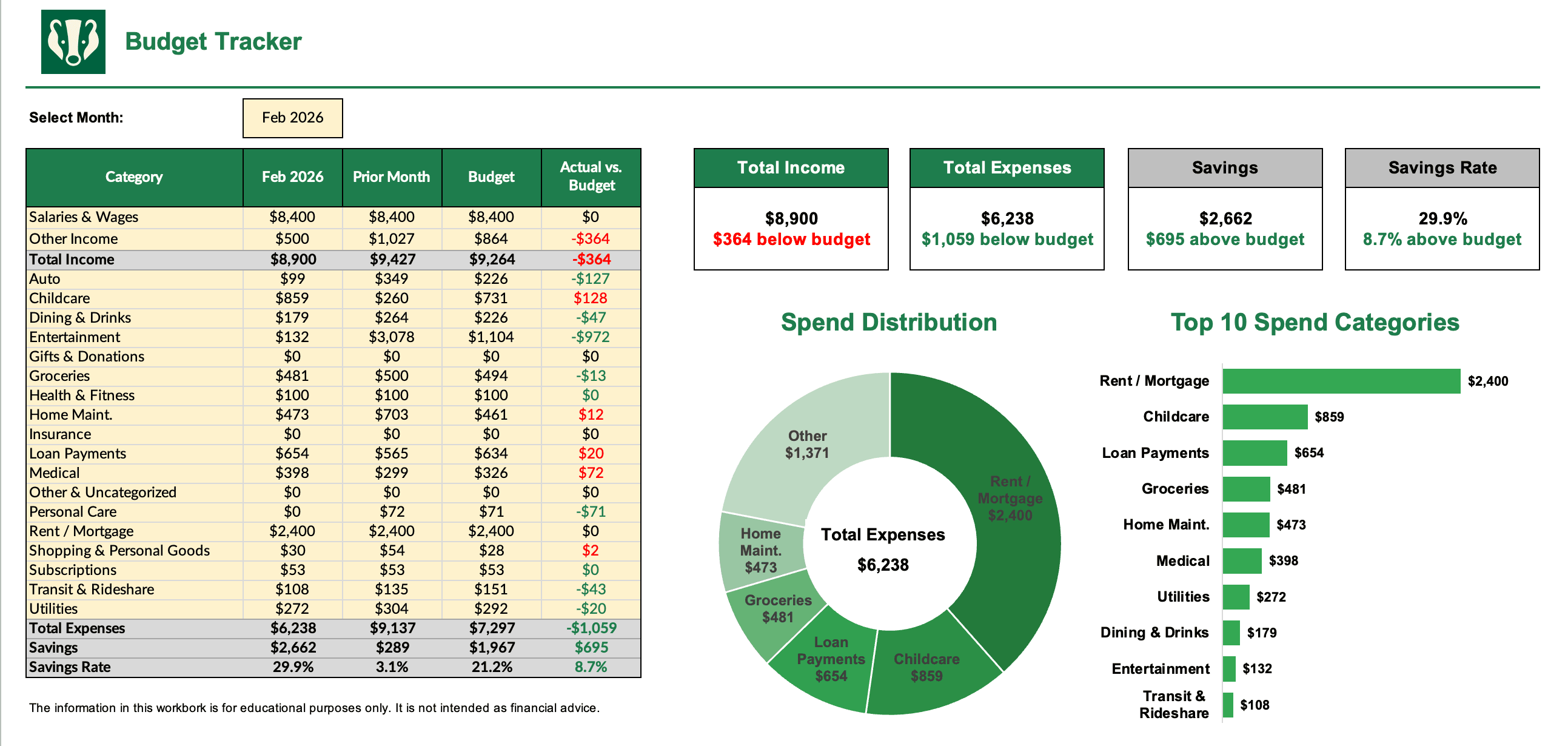
The sheet builds a professional-grade P&L report and summary insight visualizations, so you can see where your money is going and where you might be overspending. Use it as a lightweight spend management and savings tracker as you see fit.
Budget Tracker Template Preview:
Download the Budget Tracker Excel spreadsheet:
Make a copy of the Budget Tracker Google Sheet:
Completion instructions:
- Download your transaction data from your online bank and credit card accounts in CSV format for the 3 most recent completed months
- Follow the instructions on the Data Input tab to consolidate and organize your banking data
- On the Budget Tracker tab, select a month and fill out budget values to view the full P&L report and summary insights
Related free template: Monthly Bill Tracker Template — Free monthly bill tracker and bill organizer template in Excel or Google Sheets.